

-
Achievement Unlocked! Server is now officially online! Download our game here!
Fixing Common Launcher Issues
- Thread starter UltimateDBO
- Start date
- Featured
You are using an out of date browser. It may not display this or other websites correctly.
You should upgrade or use an alternative browser.
You should upgrade or use an alternative browser.

Since it's something related to your own character, please, create a Ticket in our Discord.My game keeps crashing and I get this message, but only with one character; the other two are playable normally. What can I do? Thanks
View attachment 344

Please do open a ticket in our discordMy game keeps crashing and I get this message, but only with one character; the other two are playable normally. What can I do? Thanks
View attachment 344
Installed the game and ran the launcher, but when I login no servers show up in the server selection screen. Any ideas what could be causing that?
Edit: A couple of restarts seemed to solve the issue, nvm and thanks!
Edit: A couple of restarts seemed to solve the issue, nvm and thanks!
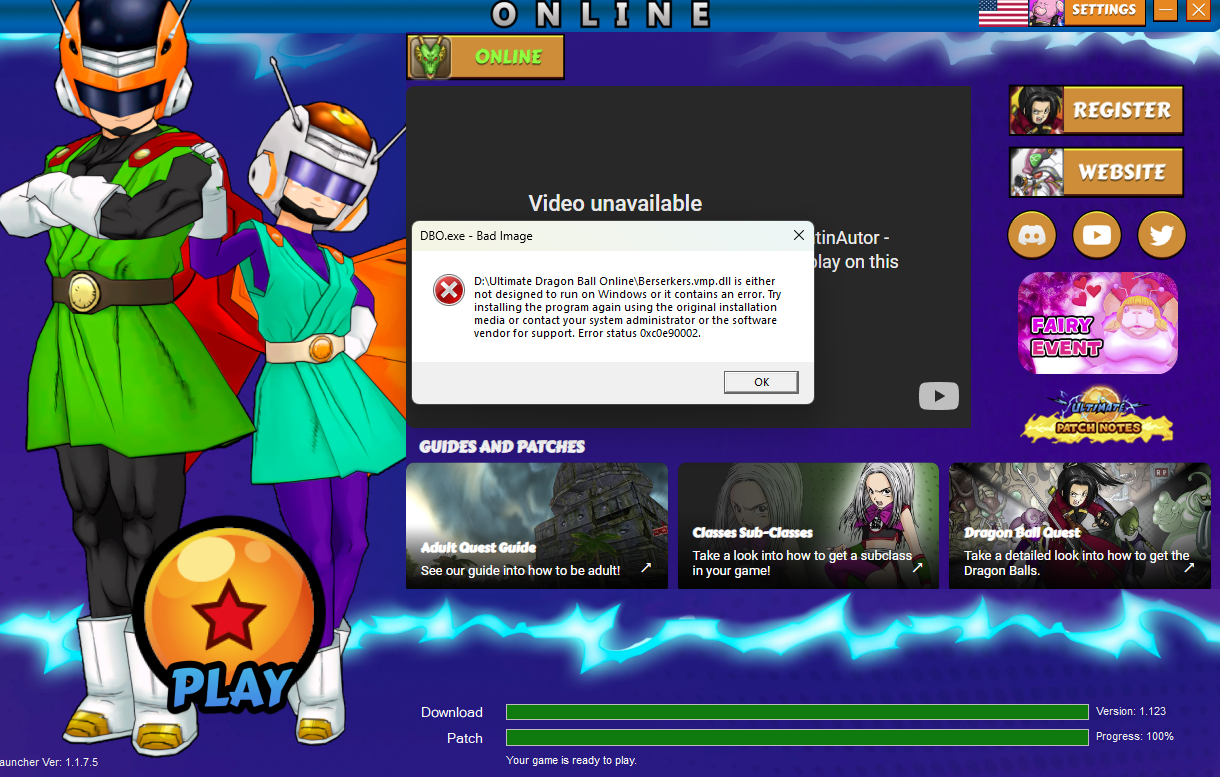
Hello. I'm having an issue after today's patch where a dll is not being recognized by the signature on Windows 11 smart control app (I think it's called?) flagging it and not allowing the game to run properly. After this 'Bad Image' pop-up appears, the launcher closes (but stays active in the system tray hidden icons to be opened up again). I've tried:
- Excluding the folder
- Excluding the Berserkers.vmp.dll file
- Re-installing the game
And the issue persists. Yesterday, the game was working just fine for me. Anyone knows how to fix this?
- Excluding the folder
- Excluding the Berserkers.vmp.dll file
- Re-installing the game
And the issue persists. Yesterday, the game was working just fine for me. Anyone knows how to fix this?
Hey, try installing the game in c:disk instead.Hello. I'm having an issue after today's patch where a dll is not being recognized by the signature on Windows 11 smart control app (I think it's called?) flagging it and not allowing the game to run properly. After this 'Bad Image' pop-up appears, the launcher closes (but stays active in the system tray hidden icons to be opened up again). I've tried:
- Excluding the folder
- Excluding the Berserkers.vmp.dll file
- Re-installing the game
And the issue persists. Yesterday, the game was working just fine for me. Anyone knows how to fix this?
View attachment 391
Oh no, don't worry, it's fine. I've found out that it's due to a feature in W11 called 'Smart App Control'. Basically makes it so that every time you try to open an app, it checks if it has signature or if it was registered in the antivirus' database. If neither are true, it blocks the application entirely. This happened for that dll. Once I've disabled that feature, the game works normal now.Hey, try installing the game in c:disk instead.
Oh, interesting. Yeah maybe we can send the dll for whitelisting actually.Oh no, don't worry, it's fine. I've found out that it's due to a feature in W11 called 'Smart App Control'. Basically makes it so that every time you try to open an app, it checks if it has signature or if it was registered in the antivirus' database. If neither are true, it blocks the application entirely. This happened for that dll. Once I've disabled that feature, the game works normal now.
Hello, in this thread I'm gonna give some fixes for common issues with the game and Launcher itself.
1- False Positive Issues; Sometimes, the Launcher can be flagged as a potential unwanted software, a false positive. Every new launcher version, we are sending to Microsoft to make a analysis and whitelist the launcher, but sometimes your computer or local Windows Defender won't have access to the latest version of database and make the Launcher be flagged as false positive, so we truly recommend players to add the game folder and the launcher as an exception in the antivirus' settings.
2 - Launcher not opening and Infinite Update Loop; This is happening due to the missing of a lib for the game. To fix it, you just need to download and install Microsoft .NET Framework version 4.8 or above. You can find the link here
3 - Error during the launcher update; Download the updater.exe put in your game folder and open the program, after that, your launcher will be properly updated.
4- Error Checking for Update: The underlying connection was closed; This is something in your internet provider or firewall blocking our Cloudflare storage services for some reason, a WorkArround to fix it, is by downloading, installing and connecting the Cloudflare Warp VPN which is 100% free and made by Cloudflare themselfs. (You can use any other VPN that you prefer).
View attachment 72
Remember to connect your WARP after installation;
View attachment 190
5- 0xc000142 error;
View attachment 73
- This is mostly likelly due to the lack of a proper Visual Redistributable version, please download and install the Visual Redistributable All-In-One and open the install_all.bat.
- If you stay with the error even with the VSR All In One installed, please, install the following .dlls in your game folder; 0x0000142 Error Fix
- Disable HD Graphics
- Disable the Windowed Mode
- Remember to open the launcher as administrator.
6- I'm receiving ???????? right after I click in Play - Please, do the following steps;
View attachment 74
- Update your Drivers
- Install Directx9
- Ensure that you are not playing the game in a external HDD or a very slow HardDrive, this could cause issues.
- Remember, you need to extract the .zip files in a folder before opening the game, do not try to open the launcher direct in the .rar
Only open the game through the Launcher.- Do not extract the folder in your desktop, extract into C: disk in your computer, recommended: Program Files.
- Try Disabling the HD Graphics options in your Launcher Settings.
- Test between windowed or fullscreen mode, it can be changed in the launcher settings.
- Restart your computer
- Open the Launcher as Administrator
- Click in verify files in your Launcher settings.
Attachments
Hello, open updater.exe as administrator, or delete the Launcher and open the updater.exe as administrator, it should fix your issue.
Deleting the launcher worked. Thank you.Hello, open updater.exe as administrator, or delete the Launcher and open the updater.exe as administrator, it should fix your issue.
Hello I just downloaded the game and installed it directly to my Program Files as directed. I even downloaded the requirements files(even though I had most already). However every time I try to run the updater, I get this error. I even tried running as an administrator and the same issue happens. What did I do wrong or what can be done to fix this?
As mentioned on our discord server, the solution to this (issue with certain ISPs in the US) is to boot any VPN for the installation. We recommend using Cloudflare VPN (free).View attachment 425
Hello I just downloaded the game and installed it directly to my Program Files as directed. I even downloaded the requirements files(even though I had most already). However every time I try to run the updater, I get this error. I even tried running as an administrator and the same issue happens. What did I do wrong or what can be done to fix this?