Fixing Common Launcher Issues

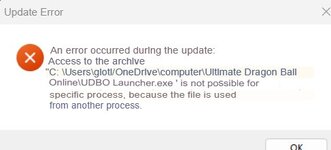
View attachment 149That's the only error I get so far, I feel like I'm doing something wrong as you mention to hit play again, but there is no other option other than going to the launcher, which I do, but then it says it is not responding and nothing happens, even after clicking the error code away.
That's because you're interacting with the game still and not the launcher itself. You have to ignore this error altogether, it's as simple as that. Use alt+tab to return to the launcher and hit the "play" button.

This error won't happen in the next cap with our launcher update.

 
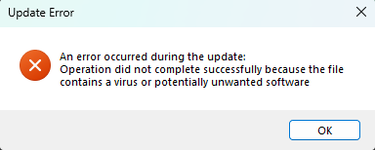
this keeps showing up when i launch the launcher, could i get help please
 

Attachments

  • {4AA5C417-A58A-48B3-8AB6-12B23674CB06}.png
    {4AA5C417-A58A-48B3-8AB6-12B23674CB06}.png
    7.3 KB · Views: 181
this keeps showing up when i launch the launcher, could i get help please
You're gonna have to whitelist the game folder + launcher because it is falsely flagging. If that doesn't work somehow you may need to turn off your antivirus/windows defender while playing, but be sure to turn it back on when you close the game.
 
Hi all!

I know that the chance of getting help with this are slim, but I thought I'll post my issue here just in case someone knows a fix.
I have tried to run the game on Linux (EndeavourOS). There are two separate issues that I get:

1. Running the game through Lutris the game runs really well and I don't get any crashes, although the playable characters are headless. There are few pop ups missing I think as well (like the dragon ball hunt notification).
2. If I run the game through wine alone, I get the heads rendered, but the GShade doesn't load and I get 'out of memory' errors.

Any help is appreciated!
 
  • Like
Reactions: Sendoku
Hi all!

I know that the chance of getting help with this are slim, but I thought I'll post my issue here just in case someone knows a fix.
I have tried to run the game on Linux (EndeavourOS). There are two separate issues that I get:

1. Running the game through Lutris the game runs really well and I don't get any crashes, although the playable characters are headless. There are few pop ups missing I think as well (like the dragon ball hunt notification).
2. If I run the game through wine alone, I get the heads rendered, but the GShade doesn't load and I get 'out of memory' errors.

Any help is appreciated!
You can ignore gshade it isn't added yet. In your launcher click off "HD graphics". Another player ran the game fine with Wine, but they had a setup specifically for gaming, so could be different.
 
You can ignore gshade it isn't added yet. In your launcher click off "HD graphics". Another player ran the game fine with Wine, but they had a setup specifically for gaming, so could be different.

Thanks for the reply! Unfortunately the turning off "HD Graphics" didn't help. Just as a side note, I am running EndeavourOS which I am mainly using for gaming as well.

I wonder what's doing this. There was a post with another user having the same issue but on the Steam Deck.


I look into the logs and have found these lines. Is this useful in any way?

Code:
CNtlPLEquipItem::SetChangeDefHeadItem (406) : [ASSERT] KeyName is NULL. GenderType:1 HeadType:4
                                
CNtlPLEquipItem::SetChangeDefFaceItem (431) : [ASSERT] [ASSERT] strKeyName != 0 Failed
                                
CNtlPLEquipItem::SetChangeDefBodyItem (459) : [ASSERT] [ASSERT] strKeyName != 0 Failed
                                
CNtlPLEquipItem::SetChangeDefBodyItem (459) : [ASSERT] [ASSERT] strKeyName != 0 Failed
                                
CNtlPLEquipItem::SetChangeDefBodyItem (459) : [ASSERT] [ASSERT] strKeyName != 0 Failed
                                
CNtlPLEquipItem::SetChangeDefBodyItem (459) : [ASSERT] [ASSERT] strKeyName != 0 Failed
 
  • Like
Reactions: Sendoku
Hi all!

I know that the chance of getting help with this are slim, but I thought I'll post my issue here just in case someone knows a fix.
I have tried to run the game on Linux (EndeavourOS). There are two separate issues that I get:

1. Running the game through Lutris the game runs really well and I don't get any crashes, although the playable characters are headless. There are few pop ups missing I think as well (like the dragon ball hunt notification).
2. If I run the game through wine alone, I get the heads rendered, but the GShade doesn't load and I get 'out of memory' errors.

Any help is appreciated!
Hi, I have managed to get the game working on Lutris without the headless characters issue by using Proton 5.13-6.
(For reference my OS is Arch)

I changed my wine version to Proton 5.13-6, and turned off DXVK (it seems to cause issues when running this game, like GShade crashing the game after the opening cutscene).
Esync, Fsync or FidelityFX hasn't caused any issues being turned on.

The only thing that I noticed so far is that you'll get a pop-up window talking about a Microsoft .Net Framework unhandled exception, after clicking play on the launcher, you can press Quit, the only thing that happens is that the launcher closes, the game will keep running with no issues.
 
Hi, I have managed to get the game working on Lutris without the headless characters issue by using Proton 5.13-6.
(For reference my OS is Arch)

I changed my wine version to Proton 5.13-6, and turned off DXVK (it seems to cause issues when running this game, like GShade crashing the game after the opening cutscene).
Esync, Fsync or FidelityFX hasn't caused any issues being turned on.

The only thing that I noticed so far is that you'll get a pop-up window talking about a Microsoft .Net Framework unhandled exception, after clicking play on the launcher, you can press Quit, the only thing that happens is that the launcher closes, the game will keep running with no issues.

Thank you for sharing this!
I have tried running it with Proton 5.13-6 but the game doesn't even launch. Lutris gives me this error:
Code:
Start monitoring process.
INFO: umu-launcher version 1.2.5 (3.13.2 (main, Feb  5 2025, 08:05:21) [GCC 14.2.1 20250128])
INFO: steamrt2 is up to date
Command exited with status: 0
Monitored process exited.
Initial process has exited (return code: 0)
All processes have quit
Exit with return code 0
2025-03-18 23:32:24,433: Game still running (state: running)
2025-03-18 23:32:24,434: Stopping Dragon Ball Ultimate Online (wine)

I can run the game with 6.3-3 but I get no grass texture, just like running with just wine. DXVK doesn't seem to make a difference for me 🤔
 
  • Like
Reactions: Sendoku and victus
Thank you for sharing this!
I have tried running it with Proton 5.13-6 but the game doesn't even launch. Lutris gives me this error:
Code:
Start monitoring process.
INFO: umu-launcher version 1.2.5 (3.13.2 (main, Feb  5 2025, 08:05:21) [GCC 14.2.1 20250128])
INFO: steamrt2 is up to date
Command exited with status: 0
Monitored process exited.
Initial process has exited (return code: 0)
All processes have quit
Exit with return code 0
2025-03-18 23:32:24,433: Game still running (state: running)
2025-03-18 23:32:24,434: Stopping Dragon Ball Ultimate Online (wine)
Have you tried lefting the launcher running for a few minutes? When I first ran my launcher with this config, it took quite a few minutes(5min+) for the launcher to pop up while the only thing I could see was that the app hadn't crashed yet, because Lutris was still giving me the option "stop", implying the launcher was still running.

Most of the time return code 0 indicates that the process has exited successfully in Lutris, so nothing wrong appears to have happened

Here are the libs that I have installed for wine btw, while I don't think they are the reason based on your logs, it's nice to know just for reference

giflib lib32-giflib gnutls lib32-gnutls v4l-utils lib32-v4l-utils libpulse \
lib32-libpulse alsa-plugins lib32-alsa-plugins alsa-lib lib32-alsa-lib sqlite lib32-sqlite libxcomposite \
lib32-libxcomposite ocl-icd lib32-ocl-icd libva lib32-libva gtk3 lib32-gtk3 gst-plugins-base-libs \
lib32-gst-plugins-base-libs vulkan-icd-loader lib32-vulkan-icd-loader sdl2-compat lib32-sdl2-compat lib32-openal
 
  • Like
Reactions: Sendoku
Have you tried lefting the launcher running for a few minutes? When I first ran my launcher with this config, it took quite a few minutes(5min+) for the launcher to pop up while the only thing I could see was that the app hadn't crashed yet, because Lutris was still giving me the option "stop", implying the launcher was still running.
I have. I started watching some videos on YT to pass time and nothing came up. I had that happened before but only initially after changing to a new Wine version

Most of the time return code 0 indicates that the process has exited successfully in Lutris, so nothing wrong appears to have happened
That is good to know. I couldn't find anything specifically stating that. So I assume that the launcher is crashing 🤔

Here are the libs that I have installed for wine btw, while I don't think they are the reason based on your logs, it's nice to know just for reference

giflib lib32-giflib gnutls lib32-gnutls v4l-utils lib32-v4l-utils libpulse \
lib32-libpulse alsa-plugins lib32-alsa-plugins alsa-lib lib32-alsa-lib sqlite lib32-sqlite libxcomposite \
lib32-libxcomposite ocl-icd lib32-ocl-icd libva lib32-libva gtk3 lib32-gtk3 gst-plugins-base-libs \
lib32-gst-plugins-base-libs vulkan-icd-loader lib32-vulkan-icd-loader sdl2-compat lib32-sdl2-compat lib32-openal
Thanks for the list. I was missing some of them, but unfortunately installing them did not help either.

I also have noticed that I wasn't really using the 5.13-6 version of proton but 5.13-1 instead. I've found the right version on Valve's github but it's a pain to make install or maybe I'm just a dummy and I'm doing it wrong. I've tried to download the 5.13-6 through steam by selecting it through the compatibility list and moving it to the Lutris' runner folder and then running it with that version I get the 'Proton version Proton 5.13-6 is missing it's wine executable and can't be used'. When I look inside of the proton folder I see that it's missing '__pycache__' and 'dist' folders.

Do you know where I could get that specific proton version that is built?
 
  • Like
Reactions: Sendoku
I also have noticed that I wasn't really using the 5.13-6 version of proton but 5.13-1 instead. I've found the right version on Valve's github but it's a pain to make install or maybe I'm just a dummy and I'm doing it wrong. I've tried to download the 5.13-6 through steam by selecting it through the compatibility list and moving it to the Lutris' runner folder and then running it with that version I get the 'Proton version Proton 5.13-6 is missing it's wine executable and can't be used'. When I look inside of the proton folder I see that it's missing '__pycache__' and 'dist' folders.

Do you know where I could get that specific proton version that is built?
I installed mine in a very similar way to yours, I downloaded it through steam by selecting in the compatibility layer while trying to run the launcher as a non-steam game, I didn't need to move it to the Lutris runner folder, Lutris detected it automatically on my end.

See if you can run the game as a non-steam game on your end, in my case, the launcher would show up on the first attempt but would fail in the following ones, and the game would crashed because of DXVK, if DXVK doesn't cause issues to you, it might have a chance of working on your end.

edit: There's this guide that I used as a reference, you can skip the steps related to dbog-s and ExportDirectoryDataToXml, it was from here that I had the idea to use proton 5.13-6
 
Last edited:
  • Like
Reactions: Sendoku
I installed mine in a very similar way to yours, I downloaded it through steam by selecting in the compatibility layer while trying to run the launcher as a non-steam game, I didn't need to move it to the Lutris runner folder, Lutris detected it automatically on my end.

See if you can run the game as a non-steam game on your end, in my case, the launcher would show up on the first attempt but would fail in the following ones, and the game would crashed because of DXVK, if DXVK doesn't cause issues to you, it might have a chance of working on your end.

edit: There's this guide for DBOG that I used as a reference, you can skip the steps related to dbog-s and ExportDirectoryDataToXml, it was from here that I had the idea to use proton 5.13-6

you can also search it on the dbog forum, by searching for linux or the title "DBOG Linux Setup How-to (UPDATED FOR 2025)"

Btw thank you so much for taking your time to help me with this issue. I highly appreciate it!

I have tried running it through steam before with no luck. I've tried it now after your suggestion and I manage to launch it, but I get a black screen after the intro cutscene. I assume the DXVK is to blame. I've found that "PROTON_USE_WINED3D=1" forces steam games to run without DXVK but then it didn't launch at all.
I've tried a bunch of things, like getting Lutris to run through the steam's compatdata's prefix but Lutris was stuck at "Launching. I've tried to copy the steam's prefix to one of my wine prefixes, but to no avail. Maybe I'm missing some libs or something.
 
  • Like
Reactions: victus and Sendoku
1742412813520.png
Just downloaded the game and this what i get after pressing play on the launcher. Opening the DBO shows a windows error saying that i dont have the right version for the game, im on windows 11.
 
Btw thank you so much for taking your time to help me with this issue. I highly appreciate it!
Don't mention it, I'm just glad to help 🙂
I have tried running it through steam before with no luck. I've tried it now after your suggestion and I manage to launch it, but I get a black screen after the intro cutscene. I assume the DXVK is to blame.
If you have to use DXVK, this version has worked for me 'v1.7.2L-5ca255d', you can download it from their github, it should be in page 3 of the tags. Hope you can get it working soon 🙏
 
  • Like
Reactions: JediCore
Hello, when you receive this message, we recommend restarting your computer. It should be enough to the launcher be able to update itself.
I have already done it, but nothing....i've deleted the game, downloaded again, but nothing

for the moment i dont have any issues
 
©1984-2026 Dragon Ball, Dragon Ball Z, Dragon Ball GT, Dragon Ball Super, Dragon Ball Daima and all logos, character names and distinctive likenesses thereof are trademarks of AKIRA TORIYAMA and BIRD STUDIO / Shueisha Inc.
©2026 Ultimate DBO, is a ultimate non-profit Emulation based on the original game called "DBO Project" Created by NTL Inc at 2009-2013
ESRB Rating

Violence

Mild Suggestive Themes

Mild Language