

-
Achievement Unlocked! Server is now officially online! Download our game here!
Screen Problem
- Thread starter BL4CKSTAR
- Start date
You are using an out of date browser. It may not display this or other websites correctly.
You should upgrade or use an alternative browser.
You should upgrade or use an alternative browser.
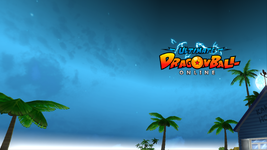
I'd wanna know how to fix that, it zoomed it and turned off my hotbars while I was in the first post-tutorial area and now the title screen does this too.
Edit: Never mind as well, there's a button in the launcher to force windowed
Edit: Never mind as well, there's a button in the launcher to force windowed
Last edited:

Hello, in your launcher settings, set up the windowed mode,Same problem!

Hi, ok, thank youHello, in your launcher settings, set up the windowed mode,
I was able to "fix" it by making the resolution 1280x720 32 bit while in fullscreen in-game. But now there's another problem. The chat windows are screwed up. They're overlapping each other and I can't read them at all. I see no option in the game to drag them.Is there a way to make the fullscreen actually work? I don't like playing it in window mode, because it shows my taskbar the entire time. I could accidentally click out of the game.

Full screen should work but the UI is simply not properly responsive on wider screens then.Is there a way to make the fullscreen actually work? I don't like playing it in window mode, because it shows my taskbar the entire time. I could accidentally click out of the game.
I've tried everything imaginable, but I cannot get the game to display properly. It's full screened and misaligned no matter what. I've tried enabling windowed mode in the launcher (when it wants to remember I set it to windowed), I've tried changing my display resolution to match the game's, I've tried changing the high DPI settings as well as tweaking everything in the compatibility tab and nothing has worked. I tried editing the SystemEnv.txt file, but it's blank and nobody ever says what specific commands to type. I made the switch from another server because I couldn't log into that game no matter what I tried, hoping things would be different here. I guess my computer hates Dragon Ball Online. No old MMORPG I've downloaded in the past has fought me as stubbornly as this game has. It would give Goku a run for his money.
Edit: I'm using a 4k tv if that matters.
Edit: I'm using a 4k tv if that matters.
Last edited by a moderator:
Hello, DBO 1.0 version is a very old game using a very old 2004 engine (Renderware), he does not have a proper 4k + Widescreen, or multiscreen support.
If you have a Widescreen or use more than one screen, that's mainly the issue.
The only hotfix that we have available, is playing the game on Windowed Mode with Vulkan + Windows Scaling set to off.
Unfurnutelly, if you have More than one screen or uses Widescreen, the Fullscreen mode will not work as intended.
We say sorry for the issue you have, it's not your fault, but it's not our server fault either, unfunutelly, is how the game was originally programmed to work.
Vulkan activated + Windowed, will fix some issues you have and make the game playable, but won't fix all of them
If you have a Widescreen or use more than one screen, that's mainly the issue.
The only hotfix that we have available, is playing the game on Windowed Mode with Vulkan + Windows Scaling set to off.
Unfurnutelly, if you have More than one screen or uses Widescreen, the Fullscreen mode will not work as intended.
We say sorry for the issue you have, it's not your fault, but it's not our server fault either, unfunutelly, is how the game was originally programmed to work.
Vulkan activated + Windowed, will fix some issues you have and make the game playable, but won't fix all of them